Choose validation that matches your predictions
A random row split can give a misleading result when rows share a customer, machine, or experiment—or when the task is to predict a later period. Validation should reflect what will be new when you use the model.
This guide uses two small synthetic regression examples to make the split rules visible. They are API recipes, not evidence of performance on a real business or forecasting problem. Each script is standalone and includes training, a baseline comparison, a split diagram, an HTML report, and a fresh-process reload check.
Choose a split
| What will be new? | Split rule | Recipe |
|---|---|---|
| A machine, customer, or experiment absent from training | Keep all rows from each group together | Grouped validation |
| A later time period | Train on earlier rows; validate on later rows | Time-ordered validation |
| Both a new group and a later period | Enforce both constraints in your own split indices | Neither recipe alone establishes both kinds of separation |
Reserve the final test set first. AutoML uses development-data validation folds to choose models. Evaluate the chosen result on the final test data once; do not repeatedly tune against that result.
Run the examples
Use Python 3.11 or 3.12 in a virtual environment:
python -m pip install 'mljar-supervised==1.4.0b1'
Download grouped script Download time-ordered script
Run either downloaded file from its working folder:
python custom_validation_grouped.py --output AutoML_GroupedValidation
python custom_validation_time.py --output AutoML_TimeValidation
Each uses standard CPU algorithms, a 60-second training budget, and two threads. No dataset download, GPU, or optional Torch packages are required. Choose a new output directory to repeat a run. These focused recipes do not require a notebook or documentation generator.
How the custom-validation API works
Set validation_strategy={"validation_type": "custom"} and pass cv to
fit(). cv is a list of (train_indices, validation_indices) pairs, with
one pair per fold. The scripts materialize the split iterator with list().
Indices are zero-based row positions in the exact X and y passed to fit. They are not original CSV row numbers, DataFrame index labels, or positions in the full dataset before holding out a test set. Build the folds after selecting and ordering development rows. Resetting the index makes this easier to inspect; it does not fix misaligned X and y.
AutoML fits its model preprocessing within each fold. Any scaling, imputation, feature selection, or target-dependent encoding you do yourself must also respect that boundary. Do not fit such transformations on the whole dataset first.
Grouped validation
Imagine eight measurements from each of 60 machines. We want to predict measurements for machines absent from training. A random row split could put measurements from the same machine on both sides.
The script creates two numeric inputs and a synthetic response with a
machine-specific effect. machine_id is used only for splitting, not as a model
input. It holds out 12 machines (96 rows) for the final test, leaving 48 machines
(384 rows) for development.
With X, y, and groups defined by the script and SEED = 42, the split is:
train, test = next(GroupShuffleSplit(n_splits=1, test_size=.2, random_state=SEED).split(X, y, groups))
X_train = X.iloc[train].reset_index(drop=True)
y_train = y.iloc[train].reset_index(drop=True)
train_groups = groups.iloc[train].reset_index(drop=True)
X_test, y_test = X.iloc[test], y.iloc[test]
cv = list(GroupKFold(n_splits=3).split(X_train, y_train, train_groups))
assert set(groups.iloc[train]).isdisjoint(groups.iloc[test])
for fit_rows, valid_rows in cv:
    assert set(fit_rows).isdisjoint(valid_rows)
    assert set(train_groups.iloc[fit_rows]).isdisjoint(train_groups.iloc[valid_rows])
Each inner fold uses 32 machines for fitting and 16 for validation. The explicit checks catch both shared row positions and shared group identifiers. GroupKFold keeps groups separate between fitting and validation.
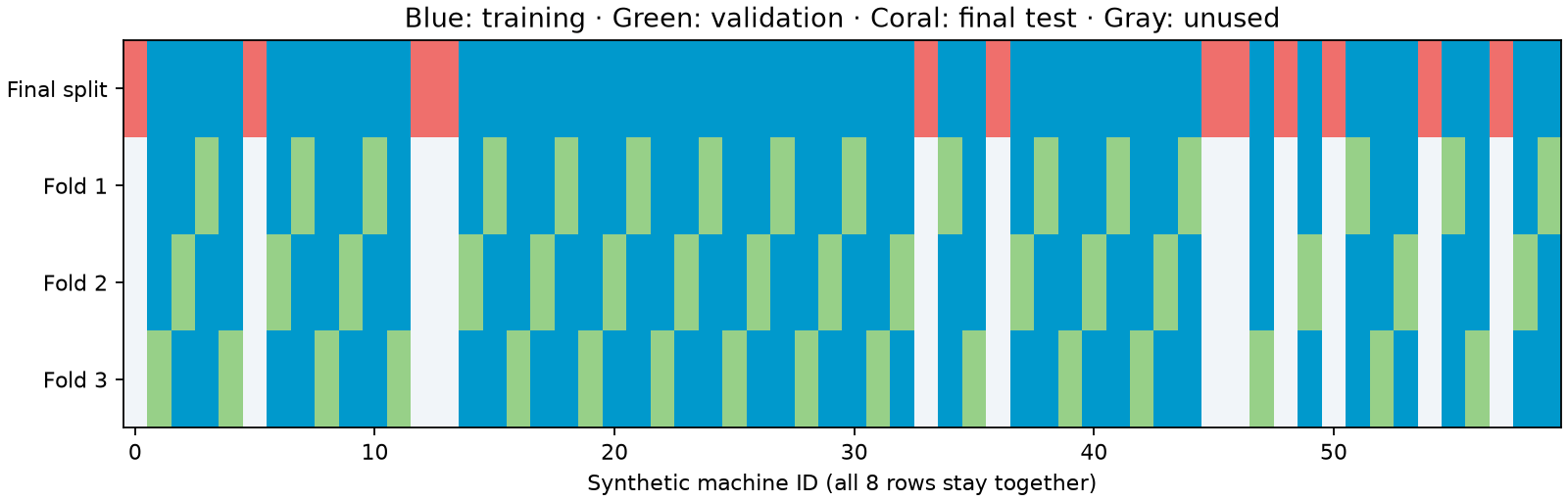
The diagram is generated from the actual indices used by the script. The first row is the outer split; the next three are the model-selection folds. Unused groups in the inner rows belong to the untouched final test set.
For classification, consider StratifiedGroupKFold when class balance matters,
and verify that each fitting and validation partition contains the required
classes. Group size and label distribution can prevent perfect stratification.
The real-data churn tutorial demonstrates this.
Time-ordered validation
Imagine a daily process whose response must be predicted in advance. This synthetic example has 360 evenly spaced daily rows. Its inputs are calendar position, weekend status, and a planned load assumed known before prediction. It uses no future measurements or target-derived lag features.
The script sorts by date, holds out the last 60 days, and leaves a seven-day gap
before that test period. Within the first 293 development days, it uses three
expanding training windows, each followed by a seven-row gap and 40 validation days.
Here data, X, and y come from the sorted synthetic data, and GAP = 7:
test_start = len(data) - 60
train = np.arange(test_start - GAP)
test = np.arange(test_start, len(data))
X_train, y_train = X.iloc[train].reset_index(drop=True), y.iloc[train].reset_index(drop=True)
X_test, y_test = X.iloc[test], y.iloc[test]
dates_train = data.date.iloc[train].reset_index(drop=True)
cv = list(TimeSeriesSplit(n_splits=3, test_size=40, gap=GAP).split(X_train))
assert train.max() + GAP < test.min()
assert data.date.iloc[train].max() < data.date.iloc[test].min()
for fit_rows, valid_rows in cv:
    assert set(fit_rows).isdisjoint(valid_rows)
    assert fit_rows.max() + GAP < valid_rows.min()
    assert dates_train.iloc[fit_rows].max() < dates_train.iloc[valid_rows].min()
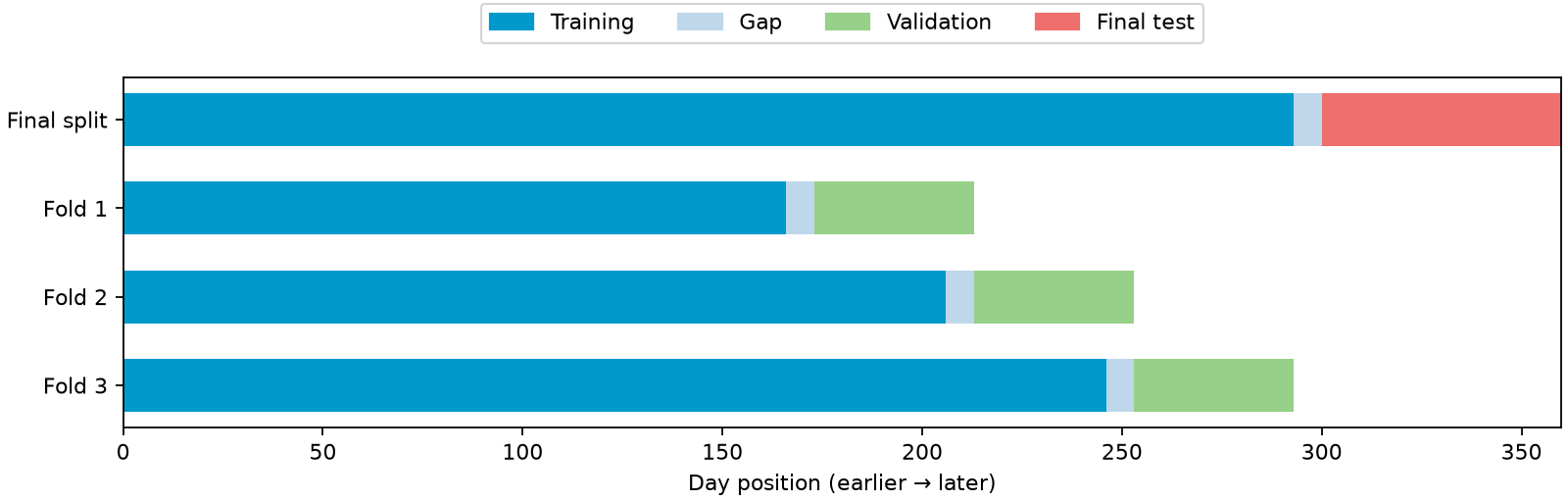
| Fold | Training row positions | Gap positions | Validation positions |
|---|---|---|---|
| 1 | 0–165 | 166–172 | 173–212 |
| 2 | 0–205 | 206–212 | 213–252 |
| 3 | 0–245 | 246–252 | 253–292 |
| Final test boundary | Development: 0–292 | 293–299 | Final test: 300–359 |
These positions refer to the sorted synthetic data. Later training windows may include earlier validation rows: at that later origin, those observations are assumed available. No fold trains on rows later than its own validation period.
TimeSeriesSplit
uses row counts for gap and test_size. Seven rows mean seven days here because
the samples are daily. With irregular timestamps, repeated timestamps, or several
rows per date, construct date-aware splits instead of assuming that equivalence.
Choose a gap based on the forecast horizon, label availability, and overlapping target windows. Seven is an illustration, not a recommended universal value. For multi-step targets, check when every training label becomes available relative to the validation prediction origin. A gap does not automatically remove leakage from rolling windows, centered statistics, or future information in features.
The earliest development rows appear only in training, not in validation. The validation score therefore describes the supplied validation windows, not every development row. The final test is later than all model-selection windows.
Fit using your folds
Both scripts use the same configuration:
automl = AutoML(
    results_path=str(output / "automl"), mode="Explain",
    algorithms=["Baseline", "Linear", "Decision Tree"],
    ml_task="regression", eval_metric="mae", total_time_limit=60,
    validation_strategy={"validation_type": "custom"},
    feature_discovery=False, golden_features=False, kmeans_features=False,
    features_selection=False, train_ensemble=False, stack_models=False,
    explain_level=1, n_jobs=2, random_state=SEED,
)
automl.fit(X_train, y_train, cv=cv)
feature_discovery=False is explicit because feature discovery does not support
custom validation in this beta. It is still included in the base installation.
Golden features, k-means features, feature selection, stacking, and ensembling are
also disabled here to keep these recipes focused. This is the tested configuration,
not a claim that every disabled option is incompatible with custom validation.
A model has a learner for each supplied fold. At prediction time, MLJAR combines those fold learners; it does not automatically replace them with one learner refitted on all development rows. In the time example, the latest fold learner trains only through day 245. The returned model is therefore not equivalent to a fresh model trained through day 292. Plan and separately validate your final training strategy when adapting the recipe to deployment.
Check the results and reload
Each script prints its baseline and AutoML test MAE, then verifies that reload
predictions agree within rtol=1e-7, atol=1e-7. It saves:
synthetic_data.csvandsplits.json: inputs and exact split indices.splits.png: a diagram of those indices.test_predictions.csv: actual response, model prediction, and baseline.metrics.json: scores, package versions, and reload difference.automl/README.html: the model-selection report.
The median baseline is fitted on development data and evaluated on the same
final test rows. Scores on these synthetic data are implementation checks, not
claims of general predictive quality. Keep the entire automl directory to reuse
the model; the HTML report alone cannot make predictions.
Both scripts passed with published MLJAR AutoML 1.4.0b1 on Python 3.11 and 3.12, including exact fresh-process prediction agreement. See the recorded validation evidence.
Adapt the scripts to your data
Replace synthetic generation with your data reader. Keep X, y, group identifiers, and timestamps aligned while filtering and sorting. Choose what counts as a group or time origin from the question you actually want to answer.
Before fitting, check nonempty partitions, integer positions in range, no overlap within a split, and the intended group/date constraints. For classification, check class coverage as well. Record the indices so you can audit the run later. Use a fresh results path when changing the split; do not resume a directory created with different data or folds.
Next, define a custom metric, read reports, or follow the real-data concrete-strength example.