Run AutoML on random data - seeking signal in the data
Historical example — not a 1.4.0b1 benchmark
The tables, screenshots, and console output below reproduce an earlier run
from the archived examples repository.
Report links are pinned to snapshot 3035b1e. The original training
date, exact package versions, and hardware are not established here. These
results have not been rerun with 1.4.0b1; use them to learn how to read a
report, not to predict current accuracy or runtime. For a new run, use the
beta installation instructions and record your environment.
This historical experiment trains AutoML on independently generated random features and labels. It illustrates why a validation leaderboard can show small improvements even when the data-generating process contains no predictive relationship.
All experiments results and code is available at GitHub.
The experiment
I've generated 3 datasets with random data. Each has 10 columns and 1k, 5k, 10k of rows. The target for each dataset is a random vector of {0, 1} - so a binary classification problem. I've used mljar-supervised AutoML python package. I run AutoML in Explain mode and features_selection=True. The AutoML will train:
Baseline(returns the most frequent class as prediction),Decision Tree,Linearmodel (aka Logistic Regression),Random Forest,Xgboost,Neural Network,Ensemble.
AutoML will train above algorithms with default hyperparameters on 75%/25% training/validation split. Additionally, full explanations will be produced for all models.
The code
The following historical code describes the experiment. It does not fix a random seed, so rerunning it will generate different data and will not reproduce the exact tables:
- generate random data,
- run the AutoML.
import numpy as np
from supervised import AutoML

COLS = 10

for ROWS in [1000, 5000, 10000]:
    X = np.random.uniform(size=(ROWS, COLS))
    y = np.random.randint(0, 2, size=(ROWS,))

    automl = AutoML(results_path=f"AutoML_{ROWS//1000}k", mode="Explain", features_selection=True)
    automl.fit(X, y)
For each AutoML run there is a directory with all results: [AutoML_1k, AutoML_5k, AutoML_10k].
Result for 1k random data
The table with models:
| Best model | name | model_type | metric_type | metric_value | train_time | Link |
|---|---|---|---|---|---|---|
| 1_Baseline | Baseline | logloss | 0.692639 | 0.17 | Results link | |
| 2_DecisionTree | Decision Tree | logloss | 0.79591 | 9.32 | Results link | |
| 3_Linear | Linear | logloss | 0.696153 | 5.83 | Results link | |
| 4_Default_RandomForest | Random Forest | logloss | 0.693047 | 7.18 | Results link | |
| 5_Default_Xgboost | Xgboost | logloss | 0.687018 | 3.86 | Results link | |
| 6_Default_NeuralNetwork | Neural Network | logloss | 0.693683 | 4.75 | Results link | |
| 5_Default_Xgboost_RandomFeature | Xgboost | logloss | 0.684524 | 0.93 | Results link | |
| 6_Default_NeuralNetwork_SelectedFeatures | Neural Network | logloss | 0.695517 | 4.56 | Results link | |
| 4_Default_RandomForest_SelectedFeatures | Random Forest | logloss | 0.696178 | 5.78 | Results link | |
| 5_Default_Xgboost_RandomFeature_SelectedFeatures | Xgboost | logloss | 0.686194 | 1 | Results link | |
| the best | Ensemble | Ensemble | logloss | 0.683784 | 0.77 | Results link |
Results plotted:
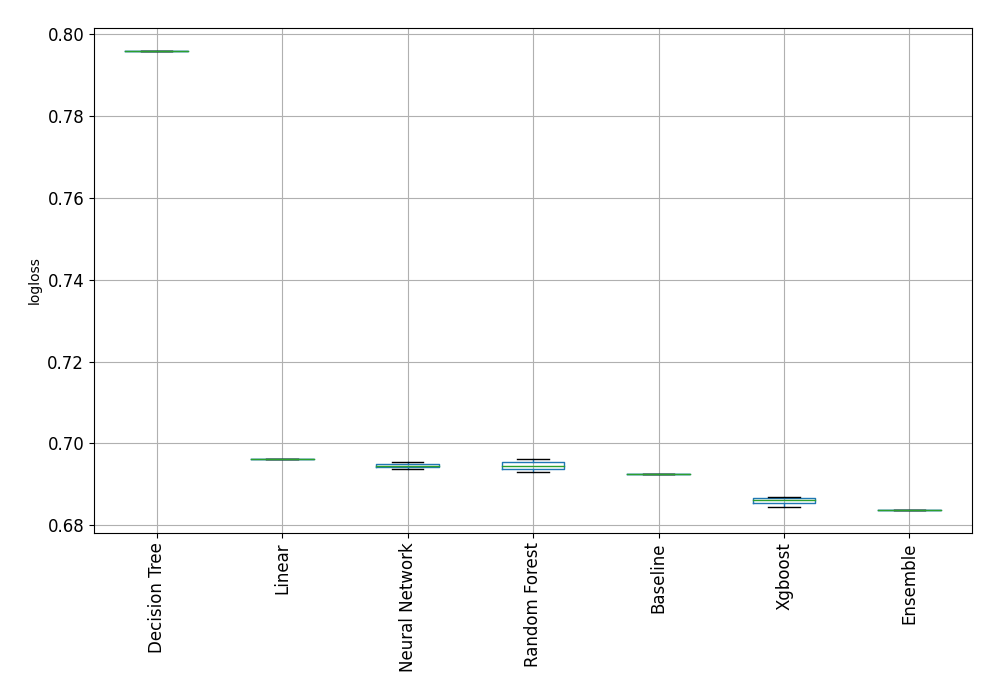
Compare algorithms
In this run, the Baseline has lower validation logloss than several more
complex models. That is consistent with the known random data generation; on
an unfamiliar dataset, the same observation could also reflect an unsuitable
model, insufficient training, or problems with the validation setup.
The percentage improvement
The % difference between the best model (Ensemble) and Baseline:
% difference = (0.6926 - 0.6837) / 0.6926 * 100.0 = 1.28%
The selected ensemble's validation logloss is about 1.28% lower than the baseline's in this run. For logloss, the classification baseline uses training class probabilities, not a probability of one for the majority class. Selecting the best of many candidates can produce a small apparent improvement by chance.
There is no universal 5% cutoff for useful signal. Reserve evaluation data before model selection, compare against an appropriate baseline using the same metric and rows, and assess uncertainty and the practical value of the difference. Repeated validation on the training portion can help assess variability; keep the final test set out of tuning decisions. A small gain can matter in one application while a larger gain may still be unreliable or unusable in another.
Learning curves
Let's look at learning curves of the Xgboost (model name 5_Default_Xgboost):
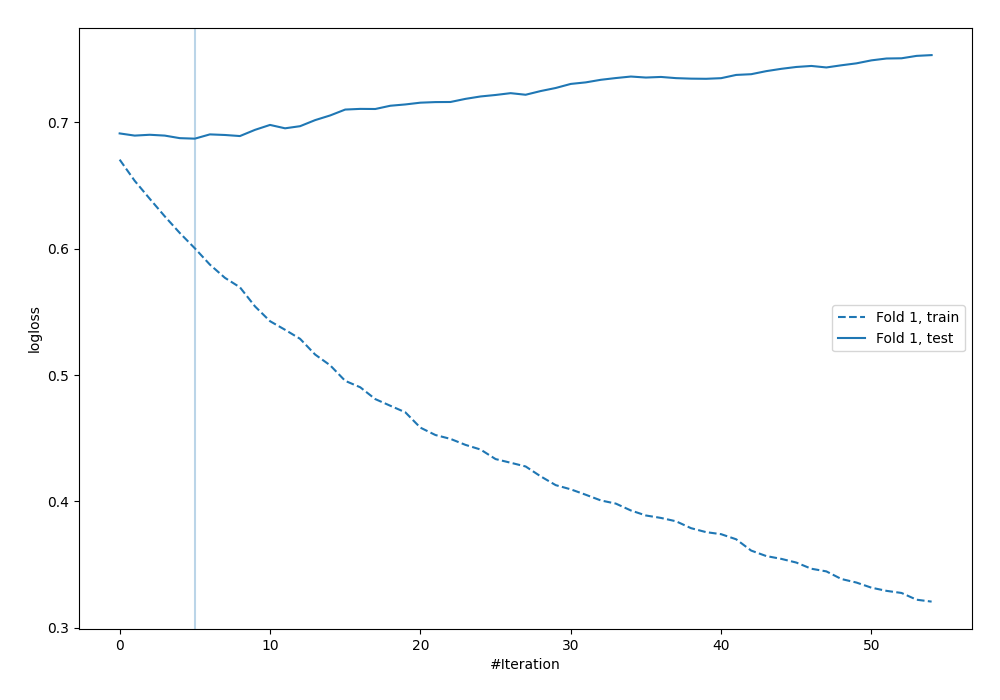
In this archived plot, training logloss decreases while validation logloss rises after only a few trees. This is evidence of overfitting in this run; it does not establish a general threshold for the number of trees to train.
Features importance
Here is the feature importance for the Xgboost trained with additional radnom_feature:
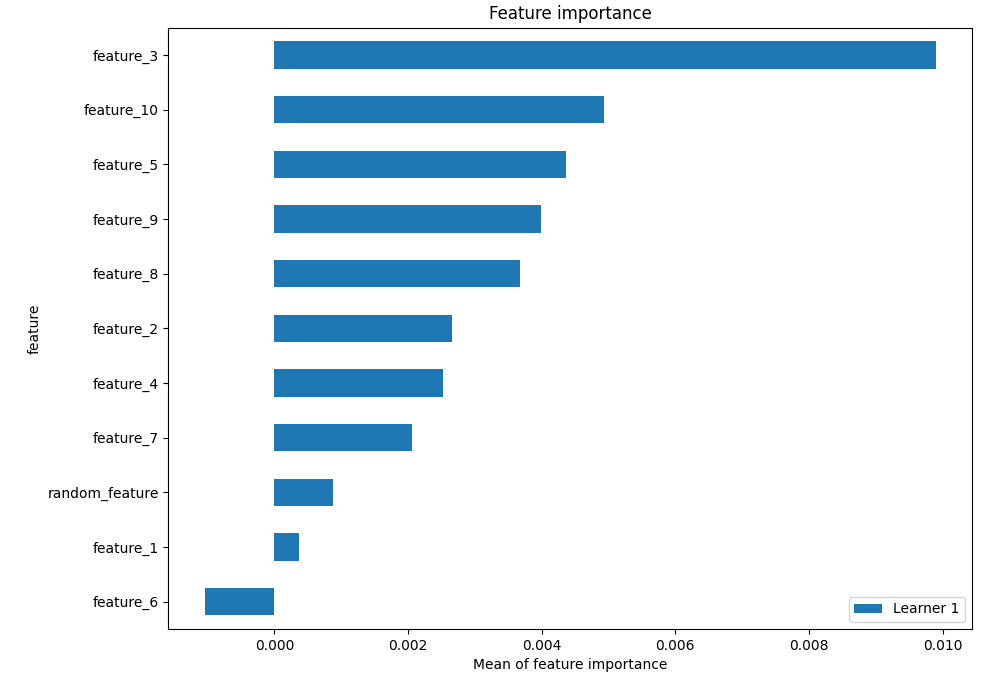
Just another random feature in the plot ... But you can see how overfitting works: feature_3 is much more important than random_feature.
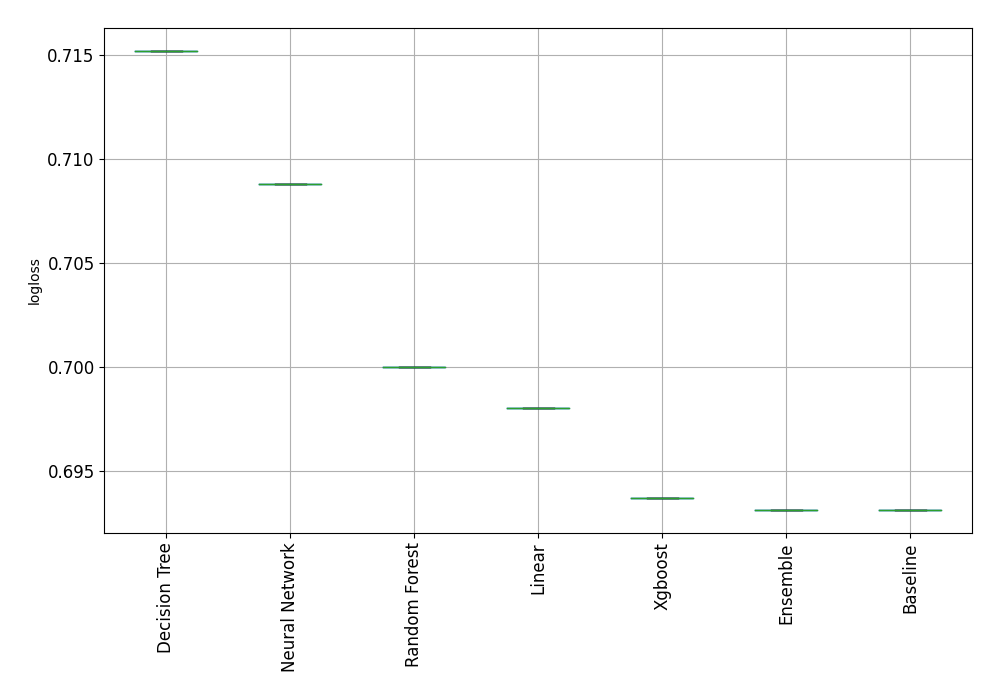
Result for 5k random data
Results for data with 5k random samples is very similar, except that Baseline was the best performing model!
Result for 10k random data
For 10k samples of random data the feature selection algorithm started to work. All features were less important than injected random_feature:
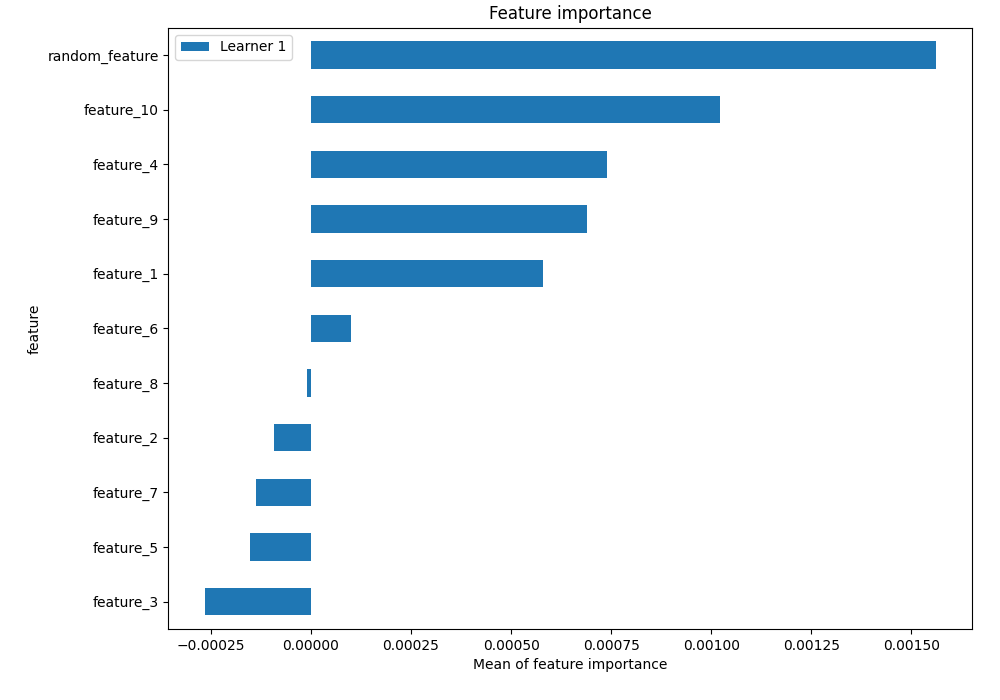
The AutoML rasied the exception that all data looks like random! (see the errors.md)
What to check on your own data
Compare your model and baseline on data excluded from fitting and model selection. If the model does not improve, investigate the inputs, target, validation split, and model settings before concluding that useful signal is absent. Consider both variability in the estimate and the consequences of the prediction errors.
Rapid overfitting or dropping all features can motivate further investigation. Neither observation, nor a fixed percentage difference from a baseline, proves that an unfamiliar dataset is random.